How to “Ping” Your Blog Posts to Ping Servers

Every time you write a blog post and hit publish, you want to be sure that post is “pinged.” This will help you increase your blog traffice. In other words, it will increase the readers of your blogged book.

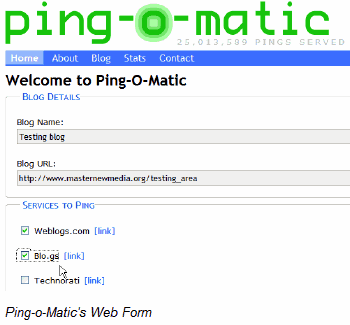
What is a ping? A ping is a push mechanism by which a blog notifies a server that its content has been updated. An XML-RPC signal, which is a set of specifications and implementations that allow software running on disparate operating systems and in different environments to make procedure calls over the Internet, is sent to one or more “ping servers,” which then generates a list of blogs that have new material. That’s a complicated way to say that when your blog post is pinged, a blog catalog or aggregator knows you have added new content.

In some cases, you have to manually ping your content or set up an account. I used to do that with Technorati when I used Blogger. In most cases, this service is automated if you set your blog up correctly or if you sign up with a blog catalog or aggregator. In WordPress this is an automated service.

How do you set up your blog to get pinged? It’s pretty simple really–at least in WordPress. After you log into your WordPress blog, go to “Settings,” then “Writing,” then scroll to the bottom where it says “Update Services.” You’ll see this copy: “When you publish a new post, WordPress automatically notifies the following site update services. For more about this, see Update Services on the Codex. Separate multiple service URLs with line breaks. Then you’ll see a space to add site update services.”

Here are services to add. I suggest you add at least the first one on this list. It’s best to add them all:

  • http://rpc.pingomatic.com/
  • http://blogsearch.google.com/ping/RPC2
  • http://1470.net/api/ping
  • http://api.feedster.com/ping
  • http://api.moreover.com/RPC2
  • http://api.moreover.com/ping
  • http://api.my.yahoo.com/RPC2
  • http://api.my.yahoo.com/rss/ping
  • http://bblog.com/ping.php
  • http://bitacoras.net/ping
  • http://blog.goo.ne.jp/XMLRPC
  • http://blogdb.jp/xmlrpc
  • http://blogmatcher.com/u.php
  • http://bulkfeeds.net/rpc
  • http://coreblog.org/ping/
  • http://mod-pubsub.org/kn_apps/blogchatt
  • http://www.lasermemory.com/lsrpc/
  • http://ping.amagle.com/
  • http://ping.bitacoras.com
  • http://ping.blo.gs/
  • http://ping.bloggers.jp/rpc/
  • http://ping.cocolog-nifty.com/xmlrpc
  • http://ping.blogmura.jp/rpc/
  • http://ping.exblog.jp/xmlrpc
  • http://ping.feedburner.com
  • http://ping.myblog.jp
  • http://ping.rootblog.com/rpc.php
  • http://ping.syndic8.com/xmlrpc.php
  • http://ping.weblogalot.com/rpc.php
  • http://ping.weblogs.se/
  • http://pingoat.com/goat/RPC2
  • http://rcs.datashed.net/RPC2/
  • http://rpc.blogbuzzmachine.com/RPC2
  • http://rpc.blogrolling.com/pinger/
  • http://rpc.icerocket.com:10080/
  • http://rpc.newsgator.com/
  • http://rpc.pingomatic.com
  • http://rpc.technorati.com/rpc/ping
  • http://rpc.weblogs.com/RPC2
  • http://topicexchange.com/RPC2
  • http://trackback.bakeinu.jp/bakeping.php
  • http://www.a2b.cc/setloc/bp.a2b
  • http://www.bitacoles.net/ping.php
  • http://www.blogdigger.com/RPC2
  • http://www.blogoole.com/ping/
  • http://www.blogoon.net/ping/
  • http://www.blogpeople.net/servlet/weblogUpdates
  • http://www.blogroots.com/tb_populi.blog?id=1
  • http://www.blogshares.com/rpc.php
  • http://www.blogsnow.com/ping
  • http://www.blogstreet.com/xrbin/xmlrpc.cgi
  • http://www.mod-pubsub.org/kn_apps/blogchatter/ping.php
  • http://www.newsisfree.com/RPCCloud
  • http://www.newsisfree.com/xmlrpctest.php
  • http://www.popdex.com/addsite.php
  • http://www.snipsnap.org/RPC2
  • http://www.weblogues.com/RPC/
  • http://xmlrpc.blogg.de
  • http://xping.pubsub.com/ping/

Click on “Save Changes.” Now, watch your traffic increase.

<<Previous Post   Next Post>>

Making Sure the “World” Knows You’ve Published in Cyberspace


Let’s assume that you’ve written your first blog post. Maybe you composed an introduction to your book and published it. You may even have scheduled two more parts of the introduction to post later the same week. How are you going to drive traffic—readers—to your blog to read the beginning of your book? In other words, how will you publicize your blog?

First, you want to “claim” your blog with some of the blog catalogs or aggregators, such as Technorati or Blogcatalog. Technorati is by far the largest. Technorati works as an Internet search engine for blogs. By June 2008, Technorati was indexing 112.8 million blogs and over 250 million pieces of tagged social media. Imagine how many it catalogs now. Your blog could be one of them.

If you signed up with Blogcatalog, which words as an aggregator, someone could find and subscribe to your blog via RSS (Really Simple Syndication) feed and have new posts waiting for them there to read.

Blogs are rated or ranked by these sites. It’s a complicated system involving links and other factors. If you do some research you can find out how they calculate this.

You’ll want to have your blog posts “pinged” to sights like Technorati and BlogCatalog automatically. Tomorrow I’ll tell you what that means and how to do that.

<<Previous Post    Next Post>>

How to Reply to Blog Comments

When you publish a post of particular interest to your readers you will know immediately—or almost immediately. Typically they will let you know what they think about what you have written. This tends especially to be true if you write about something they strongly disagree with or agree with.

I have another blog called As the Spirit Moves Me. It has its home here on my other website. However, many of my posts are also published at VibrantNation.com. The other day I published a post in both places that generated quite a few comments at VibrantNation.com. Here’s one that generated a few at As the Spirit Moves Me.

Many blog programs allow you to decide if anyone can post a comment or if you will moderate all comments. (In WordPress this is in under Settings-Discussions.) This means you decide if the comment will appear on your blog. There are also plugins that help get rid of spam comments, such as Akismet. It’s a good idea to monitor the comments on your blog–another reason to stay on top of what’s going on even if you are scheduling posts.

It’s also a good idea to reply to comments if you can. This lets your readers know that you appreciate them and the time they have taken not only to read your blog but to tell you what they think of your posts. It also allows you to dialogue with them. Notice that I did reply to those people comment on those blog posts.

You reply to comments in much the same way you would to comments on any other blog, only you do so from within your blogging program.

In some cases, you can even begin asking commenter’s questions about your blog and its subject matter and getting even better or more targeted feedback in this manner.

If you aren’t getting comments, you might not have many readers yet or you might not be striking a chord with the readers you have. Sometimes readers are just shy. It takes a few people commenting before others speak up. At VibrantNation.com, readers comment often. On As the Spirit Moves Me, I get much fewer comments. I have another blog, though, My Son Can Dance, where I get quite a number of comments simply because of the nature of the blog and the readers.

In my next post we’ll begin talking about ways to drive more traffic—readers—to your blog. That will, as I said, increase the number of comments you receive.

<<Previous Post    Next Post>>

Keeping Up with Your Blog When Using the Scheduling Option

As you’ve probably realized by now, scheduling your posts offers a definite advantage for the busy blogger or aspiring author. Now that you know how to schedule your blogs, however, you are at risk. You may walk away from your blog all week and pay no attention to what’s going on there. That’s a definite disadvantage to scheduling your posts.

You may want, therefore, to have one day a week when you actually write a live post—one that you write and publish right then and there. This keeps things fresh. It allows you to comment on what’s going on in the moment. It makes sure your blog doesn’t come across as stale.

As I mentioned, I tend to schedule a few posts each week, and then write a few live posts. Actually, in the first three months of this blog (February-April), I wrote almost all the blogs live. That explains the long gaps between some blogs. You can avoid that by using the scheduling function and writing ahead.

If you don’t choose to write a live post at some point during week (besides the one you post just after your weekly writing period), be sure you show up and check out what’s happening in terms of comments. Hopefully, your readers find your posts interesting enough to actually comment upon them. If so, you should be replying to those comments. And you should do that on a timely basis.

You’ll also want to check in each time a blog posts to send it out to all the social networking sites, like Facebook and Twitter. (More on this subject latter.)

Check back here next time to find out more about comments and responding to them.

<<Previous Post   Next Post>>

How to Schedule Your Blog Posts to Publish Later
As I mentioned in my last post, most blogging software offers you a way to write in advance and publish your posts on a schedule. This allows you to write your posts for a whole week or a month in one sitting (or two or three) and schedule them to publish whenever you want.

For example, I like to publish 3-5 posts each week. I published yesterday’s post and then scheduled this post to publish on Tuesday. I scheduled the next post to publish on Thursday. I wrote all of them on the previous Sunday. That way I knew I’d have at least three posts published in the coming week. I didn’t have time to write a fourth post on Sunday. I figured I might get time to do so later in the week. I could post it and schedule it then.

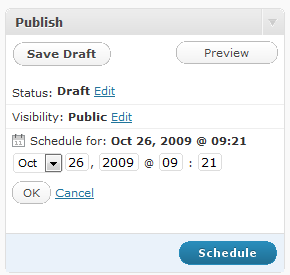
How do you do this? The function for scheduling posts in WordPress can be found just above the “Publish” button. (In most other blogging software programs it’s in about the same place.) There will be a prompt that says, “Publish immediately” with the option to “edit.” Click on “edit,” and you will discover that you can choose the time and date when you would like your post to publish. Then click on “OK,” and “schedule.” (Usually the “publish” button changes to “schedule” at this point. If it doesn’t and still says “publish,” don’t panic. You probably didn’t click “OK.” )

Now go to “Posts” and “edit.” You’ll see the list of all your published and scheduled posts.  Notice that the status of the post you just scheduled appears as “scheduled.” If you had just published it, the status would tell you how long ago you had published the post. If you published it several days ago, it would just say “published.”

<<Previous Post  Next Post>>

Blogging on a Schedule or Scheduling Your Posts

 

As I said earlier, writers write. Yet, when I suggest to those aspiring writers who need to build platform that they create a blog, most tell me they don’t want to blog because they don’t want to the pressure of needing to write a post every day or several times a week. It’s just one more thing “to do.” They don’t realize its just writing. And writers write.

An author publishing a book one post at a time in cyber space is no longer an aspiring author. He or she is an author. These authors write. And like most working authors, they write every day…or at least most days. Or so it seems. Let me explain.

If you have other writing projects with which to keep up on a daily basis or you hold down a full-time job, your blog can feel like extra work. It can seem difficult to fit in time to write daily posts.

It’s easy for me to say: Remember, you are writing a book. Every aspiring author wants to write their book. So, make it a priority. In some cases, you’ll still protest, “I just don’t have time every day to write!”

I’ve got good news for you:  Blogging a book offers a huge advantage over other ways to author a book—especially if you are short on time on a daily basis. Most blogging software offers you a way to write in advance and publish your posts on a schedule. So, you can sit down today, like I am doing, and knock out 3-5 posts and then schedule them to publish during the week.

Wallah! It looks like you’ve been writing 3-5 times during the week when actually you simply sat down and wrote for a few hours on one day (or two), scheduled your posts, and walked away from your blog until next week.

In my next post I’ll tell you how to do this.

<<Previous Post   Next Post>>

Writing for the Internet: Increase Ranking and Readers with Links

As you write your blog posts, you will want to consider providing links to resources you might find on the Internet. This also helps your ranking on search engine results pages (SERPs). Actually, everything you do that involves linking into or out of your blog helps SEO your blog.

For this reason, you’ll want to try and network with other bloggers who write about the same subject. See if they will agree to reciprocal linking. If so, add them to your “blog roll,” which is under “Links” on WordPress blogs (and most blogs), and then they add you to theirs. A blog roll is a listing of links to your favorite blogs—or to blogs you feel will help your readers in some way. On this blog, my blog roll contains blogs about blogging and related subjects. It also contains a few of my other blogs in case someone is interested in reading my other work.

If you feel a blog really contains helpful information or the author’s writing just shouldn’t be missed, but that blogger won’t reciprocate with a link, you can list their link on your blog roll anyway. It’s still a link and a helpful service to your readers.

Another way to add links to your blog involves commenting on other people’s blogs. This entails going out and reading what other bloggers are writing on your topic and leaving comments. The comment box almost always offers you a way to provide a link back to your blog. Additionally, this drives readers to your blog, which, in my mind, is as important as SERPs—or at least they go hand in hand.

Anyway that you can link in and out of your blog will help your ranking and bring in readers. So, link, link, link.

<<Previous Post   Next Post>>

Writing for the Internet: Compare Keywords
I am by no means an expert in search engine optimization (SEO). I know very little about SEO, and evaluating competitive keywords. I do know a little. Maybe I know more than you. So, let me tell you what little I know.

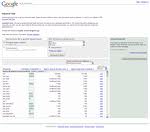
One of the best free places to go to compare key words remains Google’s own tool. You can access it here. Simply plug in your word or phrase and it will tell you how it ranks. The higher the ranking or number, the more people searching for that word or phrase.

You can also gain access to paid keyword tools. Plus, I know Google has a tool called Keyword Wonder Wheel, but I can’t seem to find it. (If anyone knows how, please share the information.)

Don’t get too excited if your keywords come up as the most polar ones. You actually may not want to rely on the most-searched phrases. Those probably already have sites or blogs dominating them. Instead you might want to dominate less-used keywords and keyword phrases. You’ll stand a better chance of working your way up to a top ten ranking on search engine results pages (SERPs)

You can find out who dominates the SERPs with your keywords by simply doing a search with those terms. For a more accurate search, put the term in quotation marks. Then, with the search up on the Google or Yahoo screen, find how many sites are in line ahead of you for top ranking. To do this, type in allinanchor: and insert your keyword after the colon. (For a more detailed explanation about all of this from a real expert, click here.)

Now that I have gotten in way over my head, I’m turning back to safe ground. Next, we’ll discuss how to schedule your blog posts so you don’t necessarily have to write every day. (This post, by the way, was scheduled to publish all by itself. Find out how next time.)

<<Previous Post   Next Post>>

Writing for the Internet: Use Keywords in Your Posts

One of the most important things to do when you write copy for the Internet involves using keywords. Keywords and keyword phrases are the words on your site that match search terms. Search terms are the words and phrases that people type into the search forms of search engines, like Google or Yahoo.

It’s a great idea to think about all the keywords you might use while writing about your book. What words or phrases, for instance, relate to your topic? These are the keyword and keyword phrases that you will use over and over again.

As you do, they populate your blog and your website. They are then found spiders, bots, and crawlers, which are the programs that harvest information for search engines. The more keywords and keyword phrases on your pages, the higher your blog or website climbs in the search engine results page (SERPs). Also, the more often you post new content to your site, the more likely that these visitors will show up to indexed what is there. This also means that if you are posting often and using lots of great keywords and keyword phrases, you will move up in the SERPs. Thus, you gain the coveted top ten Google ranking, which means when you search for your keyword or keyword phrase using Google’s search engine, your blog shows up on the first page.

There is a lot more to search engine optimization (SEO) than this, but using keywords and keyword phrases well provides a start.

<<Previous Post   Next Post>>

Writing for the Internet: Be Conversational

Okay! Let’s start writing that book!

Writing a blog tends to be a bit different than writing a “formal” book exactly because blogging lends itself to informality.  When blogging you can write as if composing an email to a friend.

Blogs began as live journals, and many people considered them streams of consciousness—simply unedited thoughts thrown together and published. You don’t want to go to that extreme. You will want to carefully choose your words and edit your copy. You want to put your best words forward.

Even if you are blogging on a technical subject or on a scholarly topic, you can approach writing your blogged nonfiction book in a conversational manner. I suggest you try this, since most people who read blogs expect the author to talk to be chatty and relaxed.

However, if you feel you must maintain a professional tone, then, by all means, choose that as the writing style of your blog. Only you know best what writing style will best communicate your message.

Well…your readers know best as well. You can ask them what they think or what they like. Try polling them. (You can add a poll to your blog easily.) If you aren’t blogging savvy enough to add a poll, simply ask them to give you feedback. At the end of a post ask: “Would you prefer that this blog be written in a more conversational and less formal tone?” See what types of comments you get back.

If you aren’t getting readers—which means you have no one to poll or to ask for comments, you can change your style and see what happens.

<<Previous Post   Next Post>>